
Every enterprise IT team eventually faces the same decision: replace the aging PC fleet or shift some portion to a virtual desktop model. For years, the choice favored hardware refresh as the familiar path forward. But that familiarity now carries a price tag it did not carry even two budget cycles ago.
Global PC prices will rise significantly in 2026, driven by surging component costs. This shifts the economic calculus in favor of desktop-as-a-service and managed virtual desktop models that absorb cost volatility through subscription pricing rather than capital expenditure. In other words, the decision is no longer a simple hardware choice pitted against another. It is a choice about which cost model protects the bottom line when component prices move faster than budget cycles.
What follows is a framework for building next year’s desktop strategy, beginning with the true cost of an unplanned PC refresh.
The predictability IT budgets once relied on is gone. According to Gartner, combined DRAM and SSD costs will surge approximately 130 percent by the end of 2026, pushing average PC prices up 17 percent. This creates a double bind: the devices you need to purchase now cost far more than they did when the budget was built, yet delaying the refresh trades a capital expense for mounting operational and security risk.
Organizations facing this pressure often extend hardware lifecycles to absorb the near-term cost shock. Gartner projects business PC lifecycles will stretch 15 percent longer as enterprises delay purchases and lean harder on aging fleets. But extending a refresh does not eliminate the cost; it shifts it. Older devices carry higher patching overhead, more help desk tickets, and a wider attack surface. An unsupported endpoint is among the easiest entry points into any network.
The choice facing IT directors in 2026 is not whether to absorb costs, but where to absorb them: in upfront capital purchases or across operations, security, and workforce agility over the next three to five years. That cost shift leads directly to the device model itself, where the next comparison begins.
Reducing VDI Hardware Requirements Across the Fleet
Virtual desktop and DaaS models move compute and storage off the endpoint and onto cloud or data center infrastructure. That shift changes what the physical device needs to do. Instead of provisioning high-spec laptops for every seat, organizations can extend the life of existing devices or standardize on lower-cost thin clients as access points rather than compute engines.
Lowering Total Cost Through Desktop-as-a-Service
Total cost of ownership is where the model tips decisively toward DaaS. According to Gartner’s 2025 Magic Quadrant for Desktop as a Service, the total cost of ownership for DaaS, when paired with thin-client endpoints, is now lower than that of a traditional laptop PC in many enterprise use cases. Set against the 17 percent PC price increase and component cost surge covered above, that represents a fundamental reversal of the assumption most refresh budgets were built on. With that cost case established, the next logical step is the hybrid question.
This shift becomes even more pronounced when you account for provisioning speed, help desk overhead, and the cost of extending unsupported devices past their intended lifecycle.
Exploring Device Refresh Alternatives for Hybrid Workforces
Most enterprises do not land on an all-or-nothing decision. The most defensible approach pairs hardware refresh for high-performance roles such as design and engineering with virtual desktops for task workers, contractors, remote staff, and seasonal hires. This hybrid model limits capital exposure to rising PC prices without requiring a fleet-wide migration, and it aligns refresh spending to actual performance needs rather than device age. From there, the discussion expands beyond cost.
Cost gets the decision onto the CFO’s desk, but it is rarely the only reason it stays there. Secure remote access remains a core driver of DaaS adoption, even as deployments increasingly stretch into efficiency and sustainability goals. That broader view sets up the operational benefits that follow.
Centralizing desktops in a managed environment means that patching, encryption, and access control are enforced consistently across the entire fleet, rather than relying on whichever device still has last quarter’s updates installed. That consistency matters more when hardware lifecycles extend beyond their intended refresh dates, since longer lifespans also mean greater exposure to unpatched vulnerabilities.
Business continuity flows from the same principle. A virtual desktop separates the work environment from the physical device, so a lost laptop or regional outage does not mean lost productivity. Employees sign in from another device and resume work instantly. That separation also accelerates employee onboarding: provisioning is not tied to shipping timelines, so a new hire across the globe can be productive on day one rather than waiting on hardware delivery.
Think about an enterprise opening a new regional office or onboarding a wave of seasonal and contract staff across the Gulf. Shipping and configuring physical hardware for every new hire can take weeks. Provisioning virtual desktops takes hours. The business consequence is not just lower cost, it is faster time to productivity and the ability to scale the workforce without a hardware procurement cycle standing in the way.
Anunta helped a leading US retailer migrate 2,000 users to a Horizon environment on Google Cloud VMware Engine on an aggressive timeline, completing the migration on schedule while improving scalability and reducing infrastructure costs. The lesson was that virtual desktops remove hardware procurement as the bottleneck on how fast a business can scale. The refresh-versus-virtual-desktop decision becomes a boardroom question about competitive agility and cost predictability, not just an IT choice.
First, inventory the current fleet by age and remaining useful life rather than assuming every device follows the same refresh schedule.
Second, model a three to five-year total cost comparison between a straight hardware refresh and a DaaS alternative, including support, security, and help desk costs, not just device price tags.
Lastly, determine the hybrid split that best fits your workforce, since most organizations will not opt for a full migration in either direction.
The scale of this market shift is already visible in workforce projections. By 2027, approximately 20 percent of workers are expected to use a hosted desktop as their primary workspace, up from 10 percent in 2019, and virtual desktops are projected to be cost-effective for roughly 95 percent of workers, up from just 40 percent in 2019.
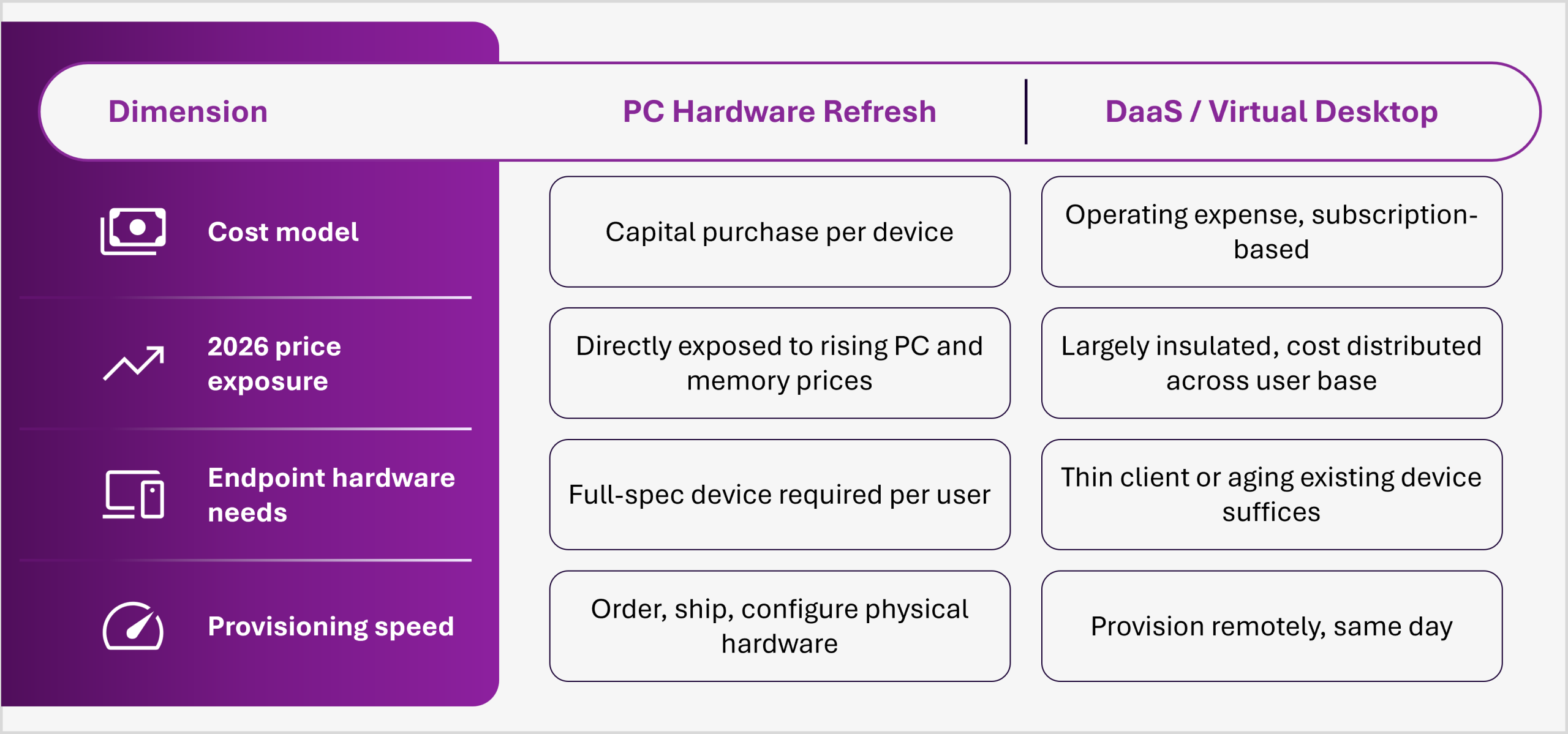
This is no longer a hardware decision measured against another hardware decision. It is a choice about which cost model absorbs component price volatility, security risk, and workforce growth going forward. When done well, it delivers lower fleet-wide capital exposure, extended device lifespans, faster onboarding for new hires, and a more consistent security posture across a distributed workforce.
As a managed virtual desktop provider, we handle the modeling and design that most IT teams do not have bandwidth to tackle alone: fleet inventory and cost modeling against your actual device demographics, hybrid deployment design that fits specific roles rather than forcing an all-or-nothing migration, and ongoing Day 2 operations to keep the environment secure, performant, and cost-optimized long after go-live.
If your refresh budget looks different from what it did two years ago, it probably should. Visit our DaaS and VDI solutions page to see how a hybrid, future-ready digital workspace fits your environment, or contact us to discuss the refresh tradeoff with our team.
1. Is it cheaper to refresh PCs or migrate to virtual desktops in 2026?
It depends on fleet composition and use case, but the cost calculus has shifted significantly. Gartner expects PC prices to rise 17 percent in 2026 due to component surges, while the total cost of ownership for DaaS paired with thin clients is now lower than traditional laptop PCs for many enterprises. A detailed three to five-year financial model tailored to your actual device inventory is the only reliable answer.
2. What does a VDI TCO calculator measure?
A VDI TCO calculator compares the full multi-year cost of hardware refresh, including devices, support, and security, against the ongoing cost of DaaS or virtual desktop subscriptions. It replaces intuition with financial modeling, which matters most when hardware prices move as quickly as they do in 2026. Many calculators also track provisioning time and help desk cost reduction, which often favors virtual desktop models.
3. How do VDI hardware requirements differ from a traditional PC refresh?
Virtual desktop models shift compute and storage to the cloud or data center, so endpoint devices need far less processing power. Many organizations extend the life of existing laptops or standardize on lower-cost thin clients instead of purchasing new high-specification devices for every seat. This directly reduces capital exposure to rising component prices.
4. What are the best device refresh alternatives for enterprises facing rising costs?
A hybrid model tends to be most defensible. High-performance roles keep dedicated hardware on a standard refresh cycle, while task workers, contractors, remote staff, and seasonal hires move to virtual desktops. This limits capital exposure without requiring a full fleet migration and aligns refresh spending to actual performance needs.
5. Does Anunta support managed virtual desktop and DaaS deployments for enterprises in the UAE and the Middle East?
Yes. We provide managed virtual desktop and DaaS deployment support across the UAE, the wider Middle East, and globally. This includes regional consultation on refresh strategy for growing or distributed teams, hybrid design tailored to regional business needs, and ongoing managed Day 2 operations.


